What is IFTTT?
Hi there, I’m Shimizu, a web director. Today, I’d like to introduce IFTTT (pronounced like “Gift” without the “G.”), an automation service that connects software and hardware to automate tasks.
IFTTT is a pioneering service in this field, having launched before terms like iPaaS (Integration Platform as a Service) or modern automation tools became widely recognized.
Basic Information about IFTTT
| Product Name | IFTTT |
| Company | IFTTT |
| Official Website | https://ifttt.com/ |
| Launch Year | 2010 |
| Free Plan | Available |

As mentioned earlier, IFTTT (pronounced “iftt” like “gift”) is a service that enables the automation of tasks by integrating various web applications and hardware.
For example, you can create workflows like “Post a new YouTube video to a WordPress site when it is published,” connecting two or more services to automate actions based on triggers, following the principle of “If something happens, then do something.”
Like Zapier, IFTTT has long been a provider of iPaaS services, and by the end of 2014, its business was valued at approximately $170 million USD. It’s a pioneering service in this field, gaining attention even before the term “no-code” became popular.
The name “IFTTT” stands for “If This Then That”.
IFTTT focuses not only on web services but also on integration with IoT devices. It supports smart devices like Google Assistant, Amazon Alexa, and many other smart home appliances.
The platform supports over 700 900 (updated on 2024-11-30) web services and IoT devices, enabling users to enhance productivity by connecting them.
For developers, detailed customization is also possible.
One standout feature is its ability to integrate with LINE.
What IFTTT Can Do
Automate Multi-Step Tasks
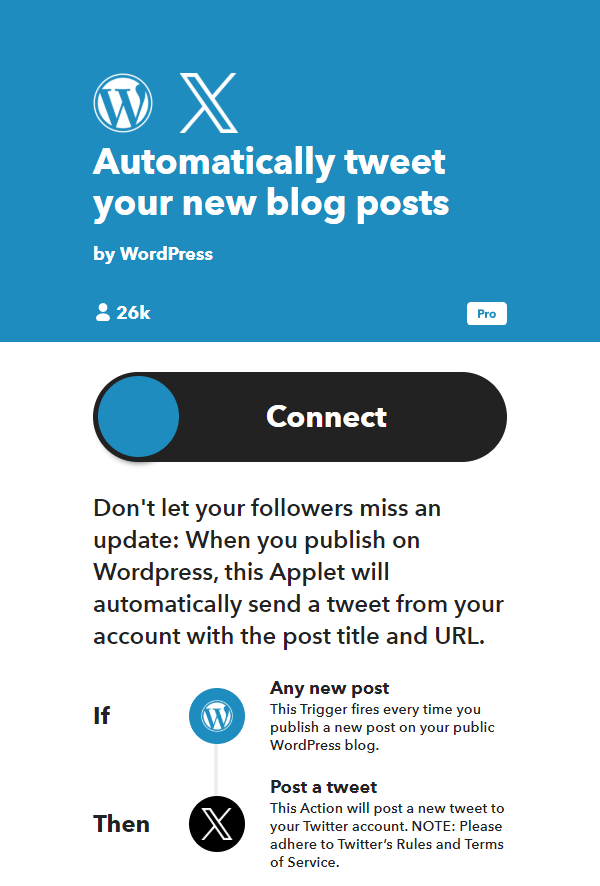
You can create workflows that connect multiple services, following the principle of “If This Then That”.
The example above demonstrates a workflow where “a new WordPress post is created and then shared on X (former Twitter).”
With the free plan, you can connect two services to create an Applet (automated workflows in IFTTT are called as Applets).
Although I don’t currently use it for work, I use an Applet for personal backup purposes, such as “Add new iOS contacts to Google Contacts”.
Here are some examples of how you can use IFTTT for work:
- When a Google Form is submitted, add the information to Mailchimp.
- When a new lead is added via Facebook Lead Ads, add the lead to a Google Ads customer list.
- Add information submitted through SurveyMonkey to Google Contacts.
Integration with IoT Devices
One of IFTTT’s key features is its ability to integrate with IoT devices.
Whether you can use this functionality depends on the manufacturer or brand of the products you’re using. However, if you have devices compatible with IFTTT, it can significantly enhance their usability.
Let’s look at some examples:
Pause your Roomba before a Zoom meeting

Tell Alexa to dock your Roomba

Adjust room temperature with Alexa

https://ifttt.com/applets/VUVcuS2b-adjust-room-temperature-with-alexa
Turn off lights at midnight

Log room temperature to a Google spreadsheet

What would you think?
It could be incredibly useful with your ideas, don’t you think?
Using IFTTT in Japanese
Unfortunately, IFTTT does not currently support Japanese language.
For those who find reading English challenging, you can use browser translation features or extensions to translate the content.
Additionally, there are many Applets created by Japanese users that are publicly available, so utilizing those is another option.
Below is a search result for “あ” in the Applet search screen.

Pricing
Currently, three plans are available: Free, Pro, and Pro+. Please check the official website for pricing details.