

What is Dropbox?
Today, I’m introducing Dropbox.
When you think of major online storage services, names like Google Drive, OneDrive, Dropbox, and Box might come to mind. Among these, Dropbox could be considered a veteran.
If I remember correctly, Google Drive and OneDrive were introduced after Dropbox.
Looking into the launch year, Dropbox started in 2008. I first came across Dropbox around 2011, and I distinctly remember being amazed at the time by the idea of files being automatically backed up and accessible from anywhere.
What I Like About Dropbox
One of my favorite features of Dropbox recently is Dropbox Capture.
This feature allows you to take screenshots or record your PC screen and easily share them.
For screenshots, you can add text or arrows to the image, and for recorded videos, you can trim unnecessary parts or capture the speaker using a webcam.
Another great point is that it can be registered as a resident program for quick access.
Dropbox Capture will be discontinued on March 24, 2025. This is very sad news…
However, it seems that the content created using Dropbox Capture will not be deleted.
Additionally, Dropbox plans to continue adding new screenshot features within the desktop app.
Although it’s disappointing, let’s look forward to the upcoming new features!
Additionally, Paper, a document service that supports Markdown (similar to Notion, though Notion is a later service), is also very convenient.
Basic Information about Dropbox
| Product Name | Dropbox |
| Company | Dropbox, Inc. |
| Official Website | https://www.dropbox.com/ |
| Launch Year | 2008 |
| Free Plan | Available |
| Pricing | ¥1,200/month ~ |
For the latest pricing, please visit the official pricing page.
Overview
Dropbox is a cloud service that provides cloud storage and file synchronization, operated by Dropbox, Inc., headquartered in San Francisco, California, USA.
Dropbox was founded in 2007 by MIT students Drew Houston and Arash Ferdowsi, receiving its initial funding from the seed accelerator Y Combinator as a startup.
As one of the pioneering online storage services, Dropbox has consistently grown its user base since its launch and continues to add various new features.
It includes tools like Dropbox Paper, a document creation tool similar to Notion, and Dropbox Capture, which offers screenshot and recording capabilities.
Even the free plan provides 2GB of storage.
What You Can Do
Overview
- Save and access files across all your devices
- Save file versions and restore previous versions
- Share files with external users
- Share files with specific users
- Dropbox Paper (a document creation tool similar to Notion)
- Manage access permissions
- Two-factor authentication
File Sharing
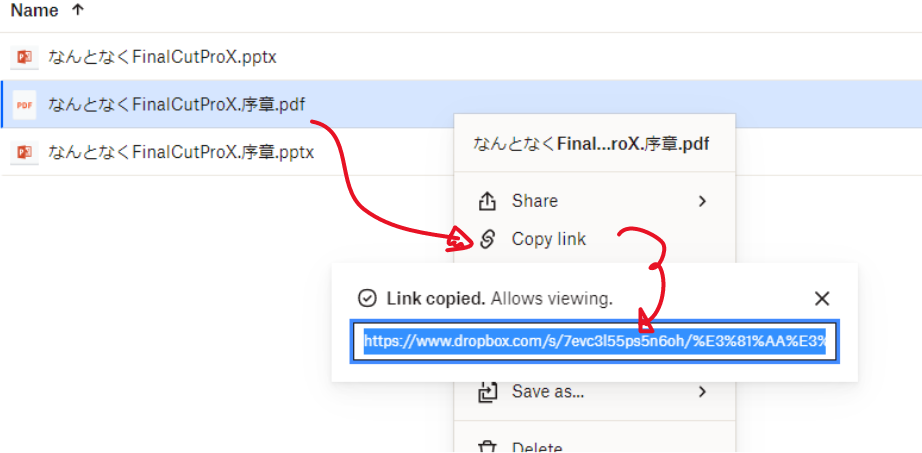
You can easily obtain sharing links for files and folders through the web browser interface, desktop, or smartphone apps.
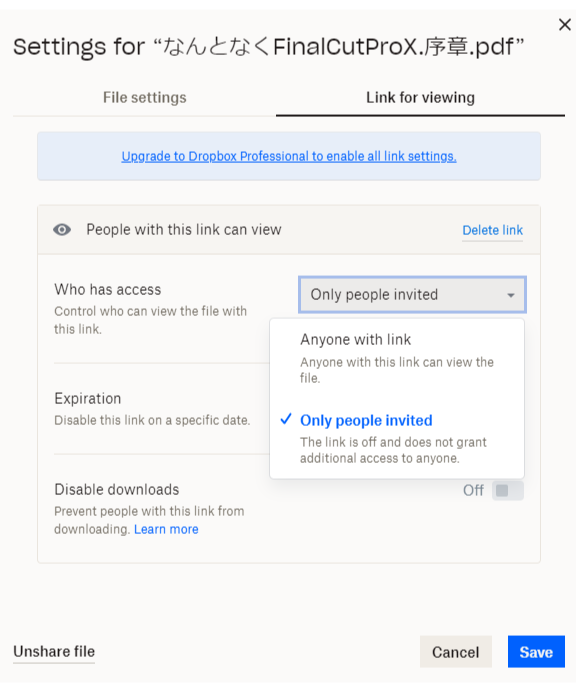
Additionally, you can customize the sharing scope by choosing to share files only with specific individuals or with anyone who has the link.
With a paid plan, you can also set sharing expiration dates and prevent downloads.
Collaborative Document Creation Feature ‘Paper’ and Notification Feature
Dropbox includes a document creation tool called Paper, similar to Notion, allowing you to create documents without leaving Dropbox.
With Paper, multiple users can collaboratively edit the same file and have conversations in a chat-like format.
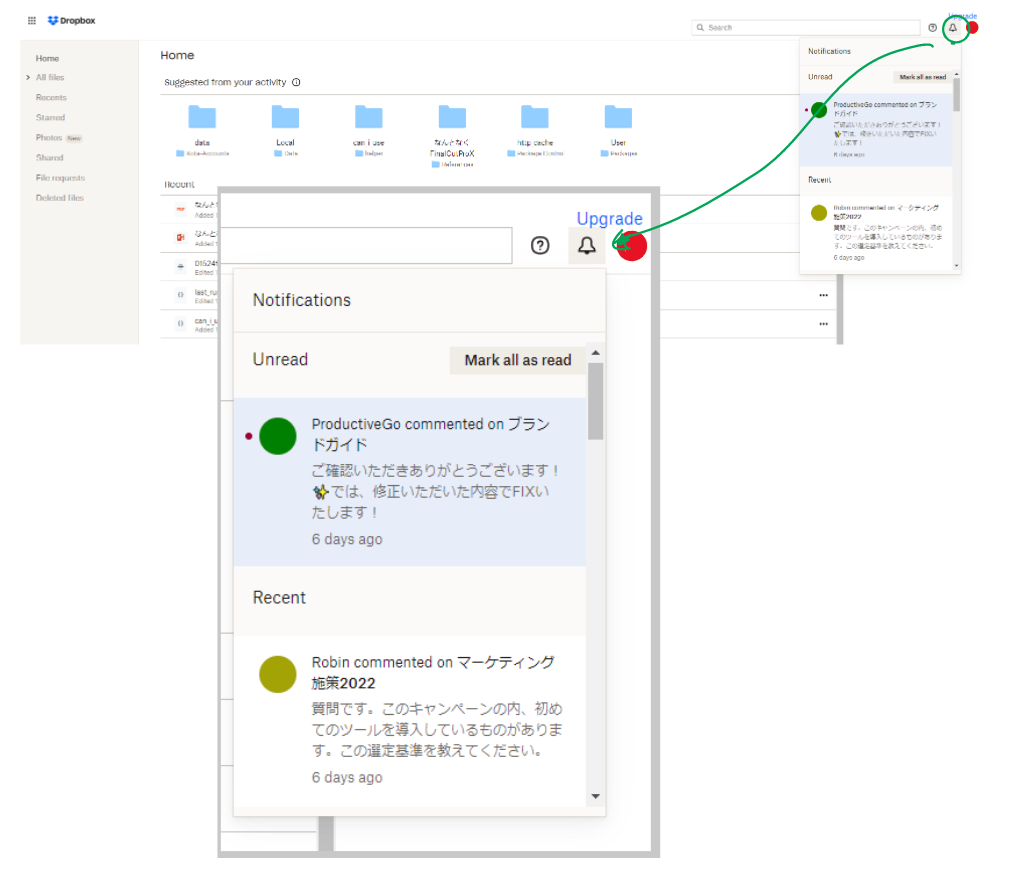
When an action occurs, push the notification is sent to various apps or browsers. Notifications also appear within the Dropbox interface.
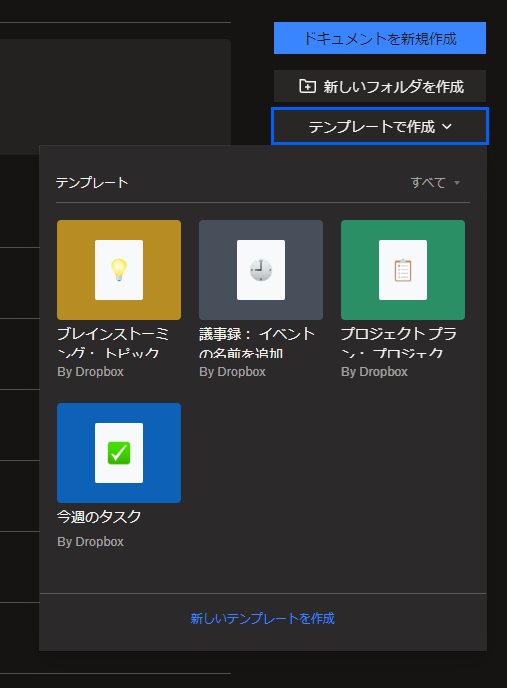
Although the number of templates is limited, Paper offers several pre-made templates for users.
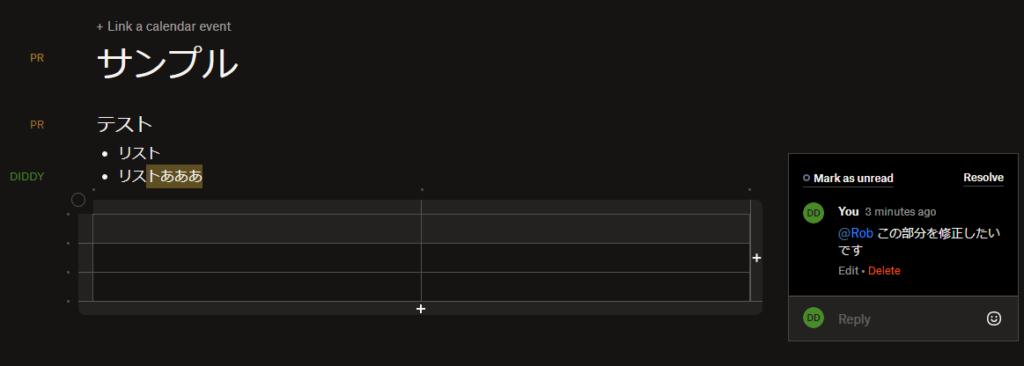
Additionally, you can add comments on any files including Paper.
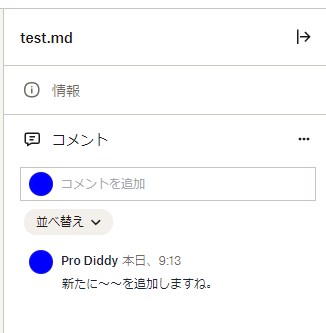
You can add comments on files including Paper files. Mention (@) syntax is available to send notifications to specific members.
A similar feature can be found in Box, a competing service, which includes a document creation tool called Box Notes.

Version Management and Restoration
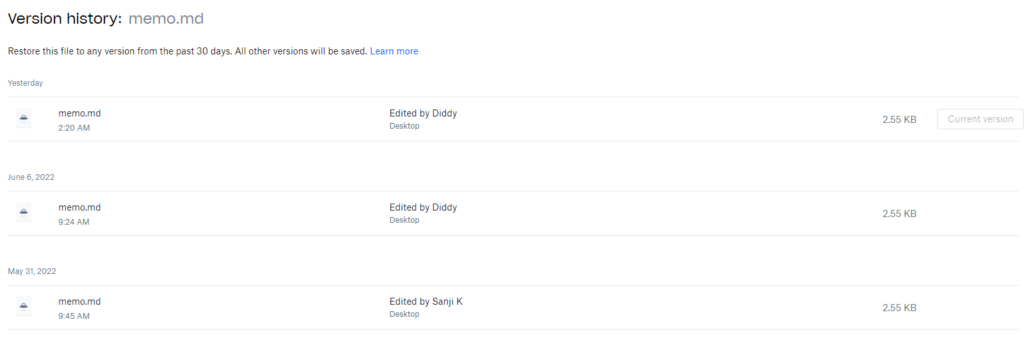
Files are automatically version-controlled, allowing you to view history from 30 days or more and restore any version as needed.
Dropbox also offers many other convenient features.
Access via Context Menu
You can access Dropbox options through the context menu. By right-clicking on a file, the Dropbox menu appears, enabling you to quickly create sharing links or check version history.
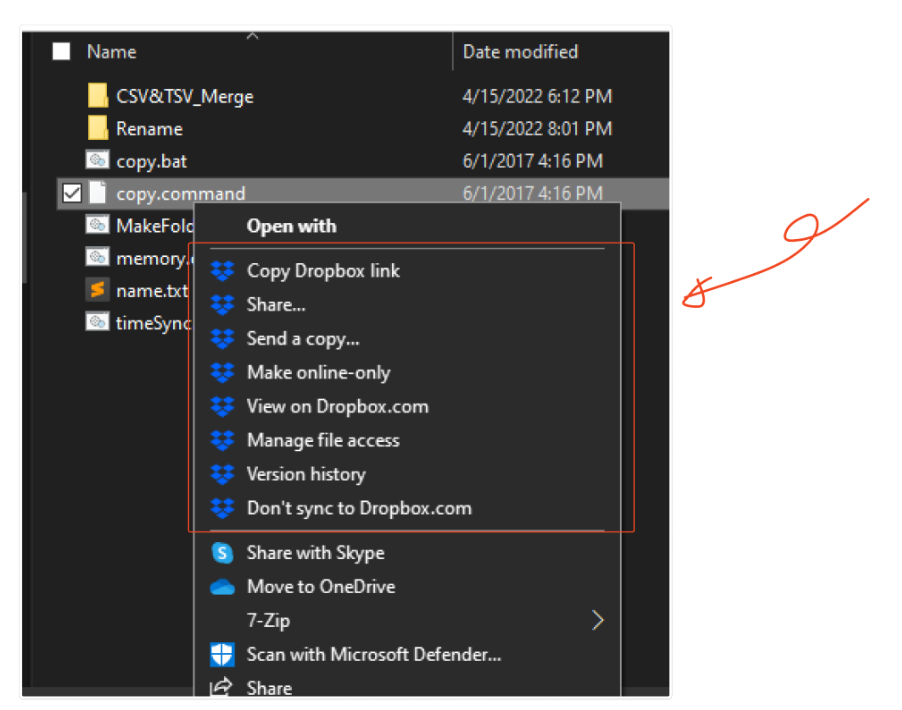
Dropbox Capture: Screenshot and Screen Recording & Sharing
Dropbox has recently introduced a feature called Dropbox Capture, which allows you to easily create, edit, and share screenshots and screen recordings.
For screenshots, you can enhance them with text and shapes to provide additional information. You can also trim videos of screen recording.
One of the standout features of Dropbox Capture is that it runs as a standalone resident program, making it quick to launch. Additionally, it automatically generates sharing links for the images and videos you create, making the process from app launch to sharing incredibly smooth. I really love this convenience.
For me, Dropbox Capture is an indispensable tool for facilitating communication with team members, clients, and customer support, among others.
I’ve recorded a video demonstrating how to use this tool, so feel free to take a look for your better understanding.
Pricing and Free Plan Ristrictions
Dropbox offers a free plan, which should be sufficient for casual use to start with.
However, the storage capacity is limited to 2GB. Since you can’t save too much data, it might be best used as a secondary storage.
On a side note, there used to be a referral program where inviting someone to create a Dropbox account via your own account would increase your storage capacity. I remember sending referral emails to not only my friends but also to every email address I owned to boost my storage.
For the free plan, you can connect up to three devices simultaneously to your account. This means you can log in on a PC, smartphone, and tablet. If you need unlimited device connections, consider upgrading to a paid plan.
There are multiple paid plans available, but even the most basic one increases the storage capacity to 2TB (as of December 1, 2024). In addition, you gain useful features for work, such as password protection for files, extended version history, and team management tools.
By the way, two-factor authentication is available even on the free plan.
For the latest information, please refer to the pricing page on the official website.


