What is Zapier?
In this article, I’m introducing Zapier, a service that automates workflows by connecting various apps.
Although it’s not yet available in Japanese, it’s a tool that can greatly boost productivity. Even if your team’s main language is Japanese, I recommend trying it out using tools like Google Translate, DeepL, or your browser’s translation feature to help.
Basic Information about Zapier
| Product Name | Zapier |
| Company | Zapier Inc. |
| Official Website | https://zapier.com/ |
| Launch Year | 2012 |
| Free Plan | Yes |
Zapier is a well-known iPaaS (Integration Platform as a Service) that allows you to connect various web applications and automate workflows.
iPaaS stands for ‘Integration Platform as a Service’ and refers to services that integrate multiple cloud-based software applications.
With Zapier, for example, you can create workflows like “Post to Slack when an email arrives in Gmail” or “Create a task in Trello when there is a response in Google Forms.” Zapier automates these workflows by connecting two or more apps and performing a specific action when a trigger event occurs.
With the ability to connect over 6,000 apps, Zapier allows you to set up these automations without needing to write any code.
Furthermore, if you’re a developer, you can also customize workflows by writing your own code.
Since the 2020s, Microsoft’s Power Automate has gained attention, partly because it is available to Microsoft 365 users.
However, Zapier’s key advantage is its extensive experience in workflow automation and the impressive number of apps it can integrate with.
Zapier can be used for a variety of purposes, including CRM automation, marketing automation (MA), sales process automation, and even automating back-office operations.
Zapier Inc., the developer of Zapier, was founded in Columbia, Missouri, in 2011 as part of the first Startup Weekend Columbia.
The company became profitable in 2014, and by 2021, Zapier’s valuation had risen to $5 billion.
What You Can Do with Zapier
Automate multi-step workflows
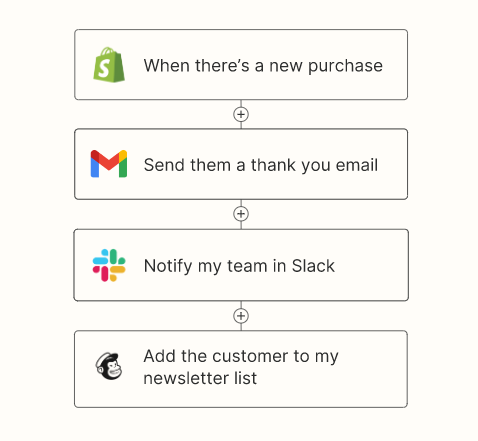
In Zapier, a single automation program is called a “Zap,” and you can set up to 100 actions in a single Zap.
For example, in the case shown in the image above, the following workflow is automated:
- When a new purchase is made on Shopify
- Send a thank-you email via Gmail
- Notify the team on Slack
- Add the customer to the MailChimp newsletter list
Please note that with the free version of Zapier, you can only connect up to two apps in a single Zap. However, this is still enough to significantly improve your workflow.
Conditional Workflows
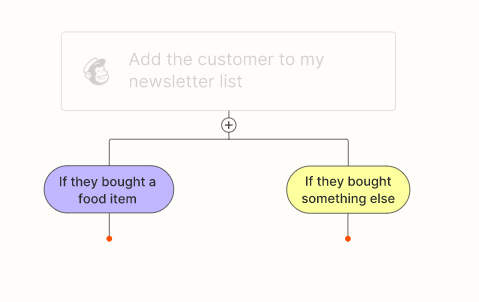
The tasks executed by the connected apps can be changed using conditional workflows.
For example, in the case shown in the image above, the workflow branches based on whether the customer purchased food or not.
フィルタ機能やスケジュール機能で実行タイミングを制御
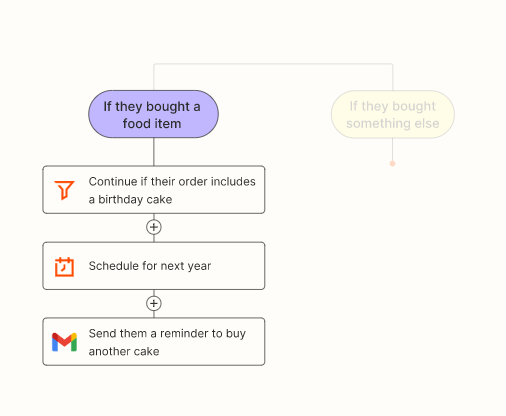
You can also schedule Zaps to run at your preferred time or delay action steps as needed.
For example, in the case shown in the image above, the following filters and scheduling are being applied:
- If the purchased item is food…
- If the purchase includes a birthday cake, continue with the action
- Schedule the action to run next year
- Send a reminder via Gmail to purchase another cake
In this way, you can automate tasks like “If the customer’s purchase includes a birthday cake, send a reminder next year to encourage them to purchase again.” This process can be handled automatically.
Convert the format of the retrieved data
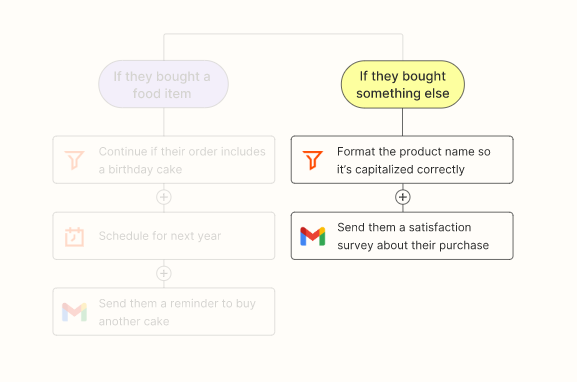
By using the Formatter feature, you can convert retrieved data into your preferred format.
For example, in the case shown in the image above, the automation performs actions such as “If a non-food item was purchased, convert the product name to uppercase and send a customer satisfaction survey email.”
Additionally, you can perform the following types of formatting:
- Convert text to lowercase
- Convert HTML to Markdown (or vice versa)
- Extract email addresses
- Extract URLsSearch for specific text
- Split text
- Compare dates
- Change date formats
- Replace text
Japanese localization
Unfortunately, Zapier does not yet support Japanese.
Therefore, for those who find reading English challenging, you can use your browser’s translation feature or a translation extension to make Zapier more accessible.
Program Creation Interface
Here’s an example of the actual Zap creation screen.
In this example, a Zap is being created where “if there’s a post in a specific Slack channel, a task is automatically created in a designated ClickUp space using the content of that post.”
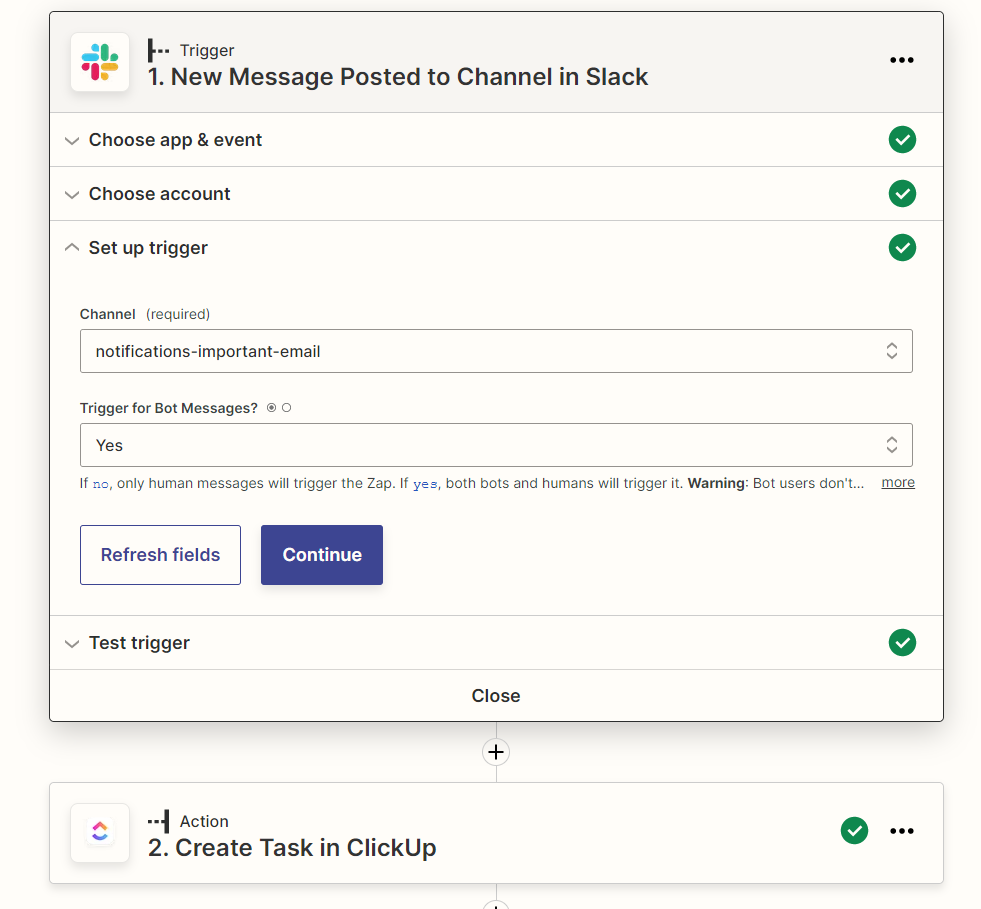
As mentioned earlier, Zapier does not yet support Japanese.
For those who find it difficult to read in English, I recommend using Chrome’s translation feature. Simply open the page you want to translate, click the translation icon that appears on the right side of the address bar, and the entire page will be translated.
Although some unnecessary parts (like English Slack channel names) might also be translated, you should still be able to use most English services without any issues with this feature.
The image below shows the previous image translated using Chrome’s translation feature.
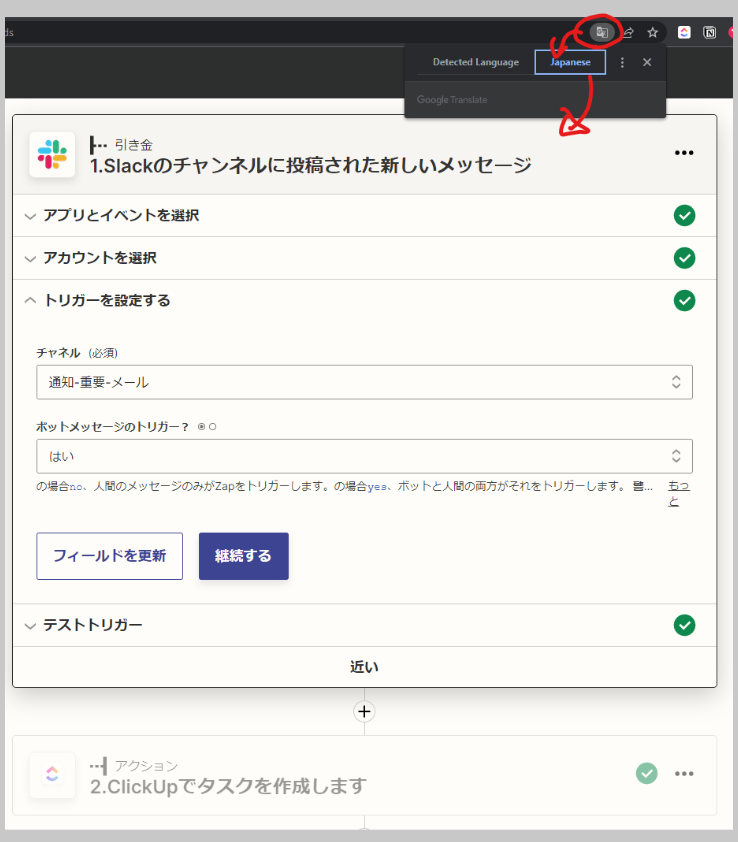
Automation services like Zapier can greatly improve work efficiency, so I highly recommend giving them a try.
Pricing
Several plans are available, so please check the official website for details.
If your organization doesn’t use many apps, the Starter plan (just above the free version) should be sufficient. However, if you need to connect more apps, the Professional plan, which removes the limit on app integrations, would be a better choice.