What is Canva?
Hi there. Today, I’d like to introduce Canva, a design tool.
Canva is a service that allows you to create images and videos using templates tailored to your needs, even if you’re not a designer.
“Of course, you can create those designs from scratch.
Basic Information about Canva
| Product Name | Canva |
| Company | Canva Pty Ltd |
| Official Website | https://www.canva.com/ja_jp/ |
| Launch Year | 2013 |
| Free Plan | Available |
Overview
Canva is a graphic design tool provided by the Australian company Canva Pty Ltd.
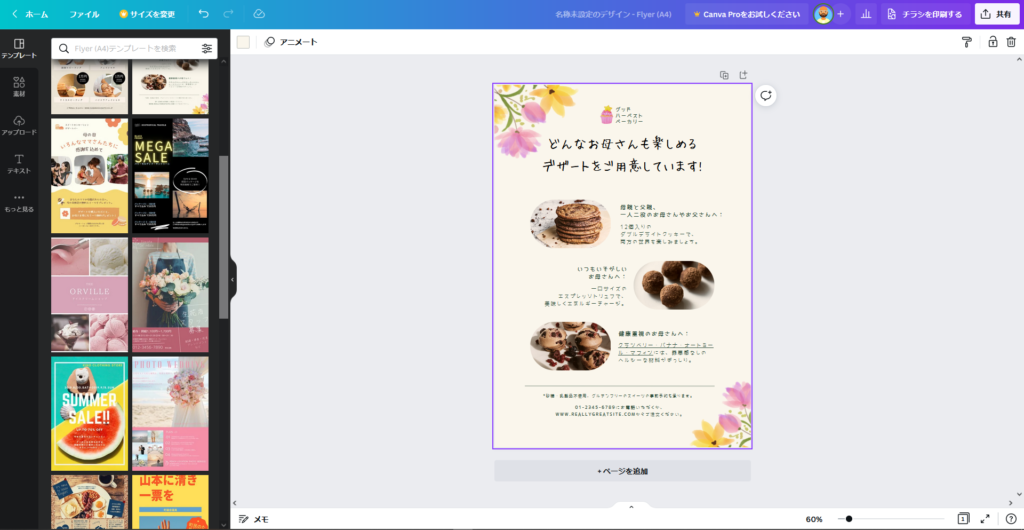
With Canva, you can create a wide variety of graphic designs directly in your browser, including social media banners, posters, flyers, business cards, logos, and more.
In 2021, video editing features were also added to the platform.
Canva’s popularity stems from its intuitive editing interface and the ability to produce high-quality designs using templates, even if you’re not a professional graphic designer or video editor.
Thanks to its ease of use, Canva has integrated with many other services. One notable example is HubSpot, where you can click a Canva button within HubSpot’s CMS to open Canva’s design page, create an image, and automatically upload it back to HubSpot.
Other major services like Notion, Mailchimp, Buffer, and Asana also are integrated with Canva.
Another standout feature of Canva is that, while offering several pricing plans, including a free plan, it provides its services free of charge to educational institutions and non-profit organizations.
As of September 2021, Canva raised $200 million in a funding round, bringing its valuation to an impressive $40 billion. Its future growth looks highly promising.
What Canva can do
Here is a list of what Canva can do. However, the platform offers so many features that this list only covers a portion of its capabilities.
Since there is a free plan available, trying it out yourself is a great way to experience its appeal.
With features like AI-generated images and scheduling posts for social media, Canva offers exceptional convenience that goes beyond being just a design tool.
- Access to a wide variety of design templates
- Text customization, such as curved text
- Use of decorative materials like ribbons
- Image editing and correction
- Automatic background removal
- Multi-user management
- Real-time collaboration
- Available on desktop applications and smartphone apps
- Schedule posts directly to social media
- Generate images using AI
- Record yourself or your screen with a screen recorder
- Resize videos
- Trim video clips
Examples of Simple Usage
I’ve created a sample video showcasing how to design a poster and edit a video. Feel free to use it as a reference for understanding the interface and workflow.
Adobe Express or Canva, which is better?
Canva is often compared to Adobe Express. Both tools offer nearly identical features, so it’s best to try both and choose the one that suits your needs.
However, if you already have an Adobe Creative Cloud subscription, the feature restrictions on Adobe Express are lifted, making it a more feature-rich option compared to Canva’s free plan. So, if you have access to Adobe CC, it would be a great idea to take advantage of Adobe Express.
Pricing
For details on each plan, features, and pricing, please refer to the page below.